> ## Documentation Index
> Fetch the complete documentation index at: https://docs.hostbyte.net/llms.txt
> Use this file to discover all available pages before exploring further.
# Best view-distance and simulation-distance for Java
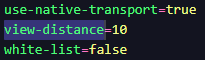
> Choosing the right view-distance and simulation-distance is the fastest way to improve performance on a Minecraft Java server. This guide gives practical, field-tested defaults for different server types and shows how to set and fine-tune them on Paper/Spigot using the HostByte Game Panel.
## Quick Recommendations
* **Small Survival SMP (≤ 15 players):** `view-distance=8`, `simulation-distance=6`
* **Mid/Busy Survival (15–40 players):** `view-distance=8–10`, `simulation-distance=5–6`
* **Events / Large Servers (40+ players):** `view-distance=6–8`, `simulation-distance=4–5`
* **Mini-games / Lobby:** `view-distance=6–8`, `simulation-distance=4`
* **Creative Build Server:** `view-distance=10–12`, `simulation-distance=6` (raise cautiously)
* **Modded (Forge/Fabric) / Heavy Redstone:** start `view-distance=8`, `simulation-distance=4–6` then tune
**⚠️ Tip:** Lowering *simulation-distance* cuts CPU load the most (mob AI, redstone, farms). Lower *view-distance* to reduce network/memory usage and exploration lag.
## What Each Setting Affects
* **view-distance** — How many chunk rings are *sent* to players (visibility). Impacts memory and bandwidth.
* **simulation-distance** — How many chunk rings are *ticked* (mob AI, crops, redstone). Impacts CPU the most.
## How to Set These Values
1. Log in to the [HostByte Game Panel](https://game.hostbyte.net/).
2. Open your **Java** server and click **Stop**.
3. Go to **File Manager** → open `server.properties`.
4. Set:
```
view-distance=8
simulation-distance=6
```
5. Click **Save**, then **Start** the server and verify TPS.
 ### Optional: Per-World Overrides (Paper/Spigot)
* **Paper:** `paper-world-defaults.yml` (global) or `/paper-world.yml` for per-world adjustments.
* **Spigot (older/legacy):** some versions allow per-world tweaks in `spigot.yml` under `world-settings`.
## Suggested Profiles (Copy & Paste)
### Balanced Survival (small SMP)
```
# server.properties
view-distance=8
simulation-distance=6
```
### Performance Under Load (events/peaks)
```
# server.properties
view-distance=6
simulation-distance=4
```
### Creative/Building
```
# server.properties
view-distance=12
simulation-distance=6
```
### Modded / Heavy Redstone
```
# server.properties
view-distance=8
simulation-distance=5
```
## Validate & Tune
1. Join the server at normal peak and run Paper **timings**:
```
/timings on
# wait 5–10 minutes of real play
/timings paste
```
2. If CPU is the bottleneck, lower **simulation-distance** by 1 and re-test. If bandwidth/exploration is heavy, lower **view-distance**.
3. Adjust one value at a time and keep notes.
## Common Pitfalls & Fixes
* **Farms stop working far away:** Simulation too low. Increase by 1 or keep players closer when AFK farming.
* **Players complain they can’t see far:** Raise *view-distance* gradually; keep simulation conservative for TPS.
* **No change after restart:** Confirm you edited the correct `server.properties`; per-world files may override on Paper.
* **Lag during exploration:** Pre-generate chunks with Chunky and keep *view-distance* moderate.
## Best Practices
* Favor reducing **simulation-distance** first for CPU relief.
* Pre-generate worlds to eliminate exploration spikes.
* Revisit settings after big player or plugin changes.
* Document final values for staff and future migrations.
## Getting Help
* **HostByte Documentation:** See related Java guides (adjust distances, reduce lag, pre-generation).
* **Support Tickets:** Join our discord server below to open a support ticket.
* **Discord:** Join our community discord here: [HostByte Discord](https://discord.gg/KUHW6QYzH6).
* **Status Page:** Check maintenance/outages: [status.hostbyte.net](https://status.hostbyte.net/).
### Optional: Per-World Overrides (Paper/Spigot)
* **Paper:** `paper-world-defaults.yml` (global) or `/paper-world.yml` for per-world adjustments.
* **Spigot (older/legacy):** some versions allow per-world tweaks in `spigot.yml` under `world-settings`.
## Suggested Profiles (Copy & Paste)
### Balanced Survival (small SMP)
```
# server.properties
view-distance=8
simulation-distance=6
```
### Performance Under Load (events/peaks)
```
# server.properties
view-distance=6
simulation-distance=4
```
### Creative/Building
```
# server.properties
view-distance=12
simulation-distance=6
```
### Modded / Heavy Redstone
```
# server.properties
view-distance=8
simulation-distance=5
```
## Validate & Tune
1. Join the server at normal peak and run Paper **timings**:
```
/timings on
# wait 5–10 minutes of real play
/timings paste
```
2. If CPU is the bottleneck, lower **simulation-distance** by 1 and re-test. If bandwidth/exploration is heavy, lower **view-distance**.
3. Adjust one value at a time and keep notes.
## Common Pitfalls & Fixes
* **Farms stop working far away:** Simulation too low. Increase by 1 or keep players closer when AFK farming.
* **Players complain they can’t see far:** Raise *view-distance* gradually; keep simulation conservative for TPS.
* **No change after restart:** Confirm you edited the correct `server.properties`; per-world files may override on Paper.
* **Lag during exploration:** Pre-generate chunks with Chunky and keep *view-distance* moderate.
## Best Practices
* Favor reducing **simulation-distance** first for CPU relief.
* Pre-generate worlds to eliminate exploration spikes.
* Revisit settings after big player or plugin changes.
* Document final values for staff and future migrations.
## Getting Help
* **HostByte Documentation:** See related Java guides (adjust distances, reduce lag, pre-generation).
* **Support Tickets:** Join our discord server below to open a support ticket.
* **Discord:** Join our community discord here: [HostByte Discord](https://discord.gg/KUHW6QYzH6).
* **Status Page:** Check maintenance/outages: [status.hostbyte.net](https://status.hostbyte.net/).