> ## Documentation Index
> Fetch the complete documentation index at: https://docs.hostbyte.net/llms.txt
> Use this file to discover all available pages before exploring further.
# How to Change Your Java Server Version (Paper, Spigot, Fabric, Forge)
> This guide shows you how to switch your Minecraft Java Edition server’s edition (Paper, Spigot, Fabric, Forge) and game version using the HostByte Game Panel. It also covers when (and when not) to use the Format option.
## Before You Start (Strongly Recommended)
* **Back up your server** (worlds, plugins/mods, configs). Use *Backups* in the panel or download files via SFTP.
* **Check compatibility**:
* **Paper/Spigot** use *plugins* (Spigot API).
* **Fabric/Forge** use *mods* (not plugins).
* Plugins/mods are version-specific—update them when you change Minecraft versions.
* **Downgrading?** Worlds created or upgraded on newer versions may not safely load on older versions.
## Step 1: Open “Server Actions”
1. Log in to the [HostByte Game Panel](https://game.hostbyte.net/).
2. Select your **Java** server.
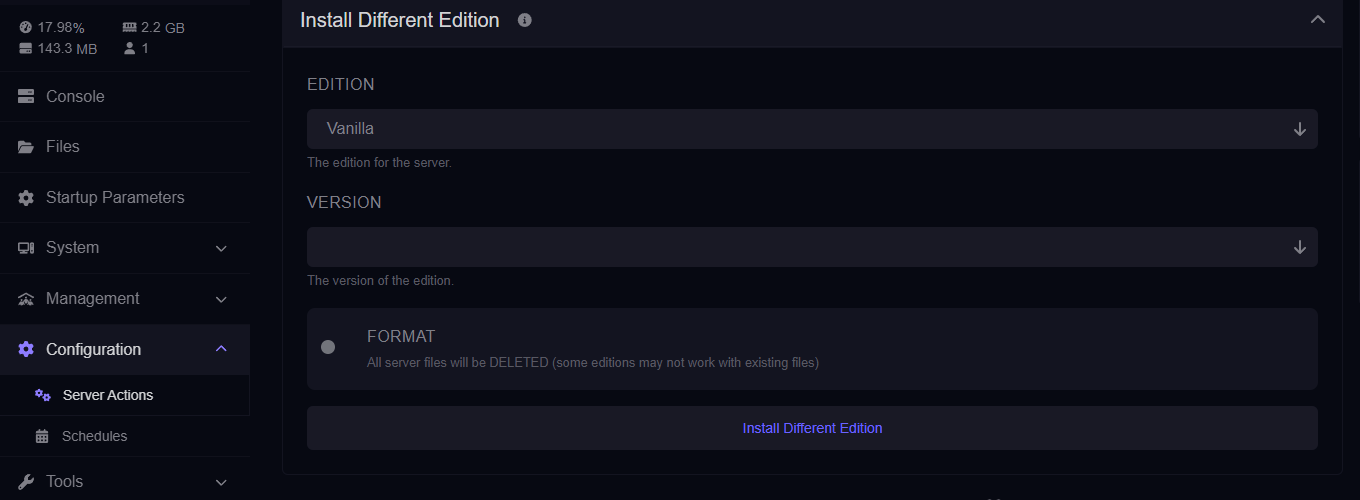
3. On the left sidebar, click **Configuration** → **Server Actions**.
 ## Step 2: Choose Your *Edition and Version*
Inside **Install Different Edition**, find the **Edition** selector and pick one:
* **Paper** — Performance-focused, Spigot-compatible plugins.
* **Spigot** — Stable plugin platform (fewer performance patches than Paper).
* **Fabric** — Lightweight mod loader (Fabric mods).
* **Forge** — Popular mod loader for larger modpacks (Forge mods).
Once you've selected which edition you want, Find and select what version you want
## Step 2: Choose Your *Edition and Version*
Inside **Install Different Edition**, find the **Edition** selector and pick one:
* **Paper** — Performance-focused, Spigot-compatible plugins.
* **Spigot** — Stable plugin platform (fewer performance patches than Paper).
* **Fabric** — Lightweight mod loader (Fabric mods).
* **Forge** — Popular mod loader for larger modpacks (Forge mods).
Once you've selected which edition you want, Find and select what version you want
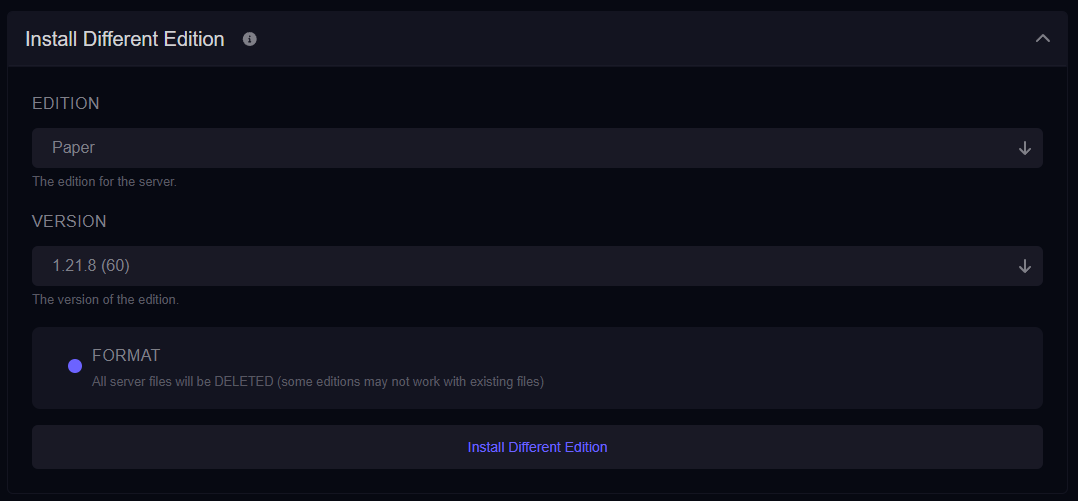 **Tip:** Match your plugins/mods to this version to avoid startup errors.
## Step 3: Decide Whether to *Format*
You’ll see an optional **Format** button. This wipes the server files and installs a clean set for the selected edition/version.
**⚠️ FORMAT WARNING**
Clicking **Format** will **DELETE ALL SERVER FILES**.
### When to use *Format*:
* Switching **between plugins ↔ mods** (Paper/Spigot ⇄ Fabric/Forge).
* Cleaning up a broken installation or starting fresh.
* Installing a brand-new modpack where a clean environment is expected.
### When to *avoid* Format:
* Minor version changes within the same edition (e.g., Paper 1.20.4 → 1.20.6), and you want to keep files.
* You have worlds/configs you still need on disk (ensure a backup first regardless).
## Step 5: Quick Install
1. Confirm your **Edition** and **Version** selections.
2. If you chose **Format**, confirm the deletion prompt after ensuring you have backups.
3. Click the panel action to **Install Different Edtion** and it'll automatically start the process.
## Step 6: Post-Change Checks
* Open the **Console** to watch startup logs for errors.
* Re-upload **plugins** (Paper/Spigot) or **mods** (Fabric/Forge) compatible with the new version.
* Verify your **world** loads and TPS is stable.
## Common Issues & Fixes
### Server boots to errors after switching
* Remove incompatible plugins/mods. Install versions matching your new edition/version.
* For mod loaders, ensure the correct loader files are present (*Fabric* vs *Forge*).
* If switching between plugin and mod ecosystems, consider using **Format** for a clean start.
### World won’t load or crashes
* Restore your backup of `world` (and `world_nether`, `world_the_end` if applicable).
* Avoid **downgrading** worlds across major versions—use a copy on older versions at your own risk.
### Client can’t join (Outdated Client/Server)
* Ensure your game client version matches the server version you just set.
* If you run a proxy/network, align the proxy’s target version with this server.
## Edition Cheat-Sheet
* **Paper**: Best performance with plugin support (Spigot API).
* **Spigot**: Stable plugin platform; fewer performance patches than Paper.
* **Fabric**: Lightweight mod loader; fast updates; Fabric *mods* only.
* **Forge**: Heavy-duty modding; large modpacks; Forge *mods* only.
## Getting Help
* **Knowledge Base:** See related Java guides (backups, plugin/mod installs).
* **Support Tickets:** Join our discord server below to open a support ticket.
* **Discord:** Join our community discord here: [HostByte Discord](https://discord.gg/KUHW6QYzH6).
* **Status Page:** Check maintenance/outages: [status.hostbyte.net](https://status.hostbyte.net/).
**Tip:** Match your plugins/mods to this version to avoid startup errors.
## Step 3: Decide Whether to *Format*
You’ll see an optional **Format** button. This wipes the server files and installs a clean set for the selected edition/version.
**⚠️ FORMAT WARNING**
Clicking **Format** will **DELETE ALL SERVER FILES**.
### When to use *Format*:
* Switching **between plugins ↔ mods** (Paper/Spigot ⇄ Fabric/Forge).
* Cleaning up a broken installation or starting fresh.
* Installing a brand-new modpack where a clean environment is expected.
### When to *avoid* Format:
* Minor version changes within the same edition (e.g., Paper 1.20.4 → 1.20.6), and you want to keep files.
* You have worlds/configs you still need on disk (ensure a backup first regardless).
## Step 5: Quick Install
1. Confirm your **Edition** and **Version** selections.
2. If you chose **Format**, confirm the deletion prompt after ensuring you have backups.
3. Click the panel action to **Install Different Edtion** and it'll automatically start the process.
## Step 6: Post-Change Checks
* Open the **Console** to watch startup logs for errors.
* Re-upload **plugins** (Paper/Spigot) or **mods** (Fabric/Forge) compatible with the new version.
* Verify your **world** loads and TPS is stable.
## Common Issues & Fixes
### Server boots to errors after switching
* Remove incompatible plugins/mods. Install versions matching your new edition/version.
* For mod loaders, ensure the correct loader files are present (*Fabric* vs *Forge*).
* If switching between plugin and mod ecosystems, consider using **Format** for a clean start.
### World won’t load or crashes
* Restore your backup of `world` (and `world_nether`, `world_the_end` if applicable).
* Avoid **downgrading** worlds across major versions—use a copy on older versions at your own risk.
### Client can’t join (Outdated Client/Server)
* Ensure your game client version matches the server version you just set.
* If you run a proxy/network, align the proxy’s target version with this server.
## Edition Cheat-Sheet
* **Paper**: Best performance with plugin support (Spigot API).
* **Spigot**: Stable plugin platform; fewer performance patches than Paper.
* **Fabric**: Lightweight mod loader; fast updates; Fabric *mods* only.
* **Forge**: Heavy-duty modding; large modpacks; Forge *mods* only.
## Getting Help
* **Knowledge Base:** See related Java guides (backups, plugin/mod installs).
* **Support Tickets:** Join our discord server below to open a support ticket.
* **Discord:** Join our community discord here: [HostByte Discord](https://discord.gg/KUHW6QYzH6).
* **Status Page:** Check maintenance/outages: [status.hostbyte.net](https://status.hostbyte.net/).