
Quick Recommendations
- Small Survival SMP (≤ 15 players):
view-distance=8,simulation-distance=6 - Mid/Busy Survival (15–40 players):
view-distance=8–10,simulation-distance=5–6 - Events / Large Servers (40+ players):
view-distance=6–8,simulation-distance=4–5 - Mini-games / Lobby:
view-distance=6–8,simulation-distance=4 - Creative Build Server:
view-distance=10–12,simulation-distance=6(raise cautiously) - Modded (Forge/Fabric) / Heavy Redstone: start
view-distance=8,simulation-distance=4–6then tune
What Each Setting Affects
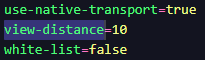
- view-distance — How many chunk rings are sent to players (visibility). Impacts memory and bandwidth.
- simulation-distance — How many chunk rings are ticked (mob AI, crops, redstone). Impacts CPU the most.
How to Set These Values
- Log in to the HostByte Game Panel.
- Open your Java server and click Stop.
-
Go to File Manager → open
server.properties. -
Set:
- Click Save, then Start the server and verify TPS.
Optional: Per-World Overrides (Paper/Spigot)
- Paper:
paper-world-defaults.yml(global) or<world>/paper-world.ymlfor per-world adjustments. - Spigot (older/legacy): some versions allow per-world tweaks in
spigot.ymlunderworld-settings.
Suggested Profiles (Copy & Paste)
Balanced Survival (small SMP)
Performance Under Load (events/peaks)
Creative/Building
Modded / Heavy Redstone
Validate & Tune
-
Join the server at normal peak and run Paper timings:
- If CPU is the bottleneck, lower simulation-distance by 1 and re-test. If bandwidth/exploration is heavy, lower view-distance.
- Adjust one value at a time and keep notes.
Common Pitfalls & Fixes
- Farms stop working far away: Simulation too low. Increase by 1 or keep players closer when AFK farming.
- Players complain they can’t see far: Raise view-distance gradually; keep simulation conservative for TPS.
- No change after restart: Confirm you edited the correct
server.properties; per-world files may override on Paper. - Lag during exploration: Pre-generate chunks with Chunky and keep view-distance moderate.
Best Practices
- Favor reducing simulation-distance first for CPU relief.
- Pre-generate worlds to eliminate exploration spikes.
- Revisit settings after big player or plugin changes.
- Document final values for staff and future migrations.
Getting Help
- HostByte Documentation: See related Java guides (adjust distances, reduce lag, pre-generation).
- Support Tickets: Join our discord server below to open a support ticket.
- Discord: Join our community discord here: HostByte Discord.
- Status Page: Check maintenance/outages: status.hostbyte.net.